
Learning how to check SIM Owner Details online helps you review your own SIM registrations, identify a mobile network, and investigate an unexpected result. People often search for SIM information after buying a connection, reviewing old numbers, or noticing an unfamiliar SIM count.
Checking SIMs registered against your CNIC is different from identifying the network associated with a mobile number. Neither process gives unrestricted access to another person’s private subscriber information.
This guide explains how to use the official online checking system, what its results mean, when a network-checking method is appropriate, and how to troubleshoot common problems safely.
Purpose: This article is for educational purposes and personal self-checks only. It does not provide confidential subscriber records, another person’s CNIC details, call history, private messages, or live phone-location tracking.
Your CNIC is an important identity document in Pakistan, and keeping your identity information accurate is essential when managing mobile registration. For official guidance about the Computerised National Identity Card (CNIC), visit NADRA’s official CNIC information page. For questions about SIM registration or a mobile connection linked to your identity, use the official SIM Information System or contact your mobile network operator.
Quick Answer: How to Check SIM Owner Details Online
To review the total number of SIMs registered against your own CNIC, visit Pakistan’s official SIM Information System.
- Open the official website.
- Select the CNIC option, or the Foreign ID option if it applies to you.
- Enter your own identity number in the requested format.
- Complete the verification field displayed on the page.
- Submit the form and read the result.
- Contact the relevant mobile network operator if you cannot explain the result.
The official service is intended to show the total number of SIMs registered against the entered CNIC. Do not assume it automatically provides a complete list of mobile numbers or the private identity details of subscribers.
If your purpose is to identify the network associated with a number, the official website describes a separate SMS method. Instructions and charges can change, so check the live portal before using that service.
1. What Does SIM Owner Details Online Check Mean?
The phrase SIM Owner Details Online Check is used for several searches related to mobile registration and verification. However, the searches do not all refer to the same information.
CNIC-based SIM checking means reviewing the total SIM count reported against your own CNIC through the official checking system.
Network identification means checking which mobile network is associated with a number through an available service.
SIM registration verification means asking the relevant operator to verify the registration or status of a SIM you own.
Subscriber identity lookup means attempting to obtain private information about the person registered to a number. This is different from a network check and should not be assumed to be publicly available.
Knowing which task you need to perform helps you select the right method. For example, if you are concerned about a SIM registered against your own CNIC, a CNIC-based check is more relevant than a number-based network query.
For a broader explanation, read our SIM Owner Details in Pakistan: Complete Guide.
2. Why Should You Check Your Own SIM Registrations?
Reviewing your own SIM registrations can help you identify questions that need clarification without relying on unofficial lookup websites.
Review your mobile connections
You may have used several SIMs over the years. Some connections may be old, replaced, or no longer part of your regular routine. Checking your own CNIC-linked SIM count helps you compare the displayed result with the connections you remember.
Investigate an unexpected result
If the number of SIMs shown is higher or lower than expected, do not immediately assume that fraud has occurred. Confirm that you entered the correct information and understood what the service displays. Contact the operator if the difference remains unexplained.
Check after obtaining a new SIM
When you acquire a connection, follow the authorised registration procedure and keep any receipt or transaction reference. If you later notice a registration problem, these records can help you explain the situation to the operator.
Respond to an unexpected service change
If your SIM suddenly stops working or you receive a replacement notification you did not request, contact your operator through an official channel. A service interruption can have several causes, but an unexplained change deserves attention.
Protect important accounts
Your mobile number may be used for account recovery, banking alerts, and verification messages. Keeping your mobile account secure can also help protect other services linked to it.
3. What Should You Prepare Before Checking Online?
Prepare your own identity information, make sure your internet connection works, and use the official website: https://cnic.sims.pk/. The portal offers CNIC and Foreign ID options; choose the one that applies to you. Decide whether you need a CNIC-linked SIM count, network identification, or help with a particular subscription, because these require different methods.
Privacy reminder: Do not post your CNIC, identity-card image, verification codes, or other sensitive information in public comments or send them to an unknown person who promises to perform a lookup for you.
4. How to Check SIM Owner Details Online Through the Official Portal
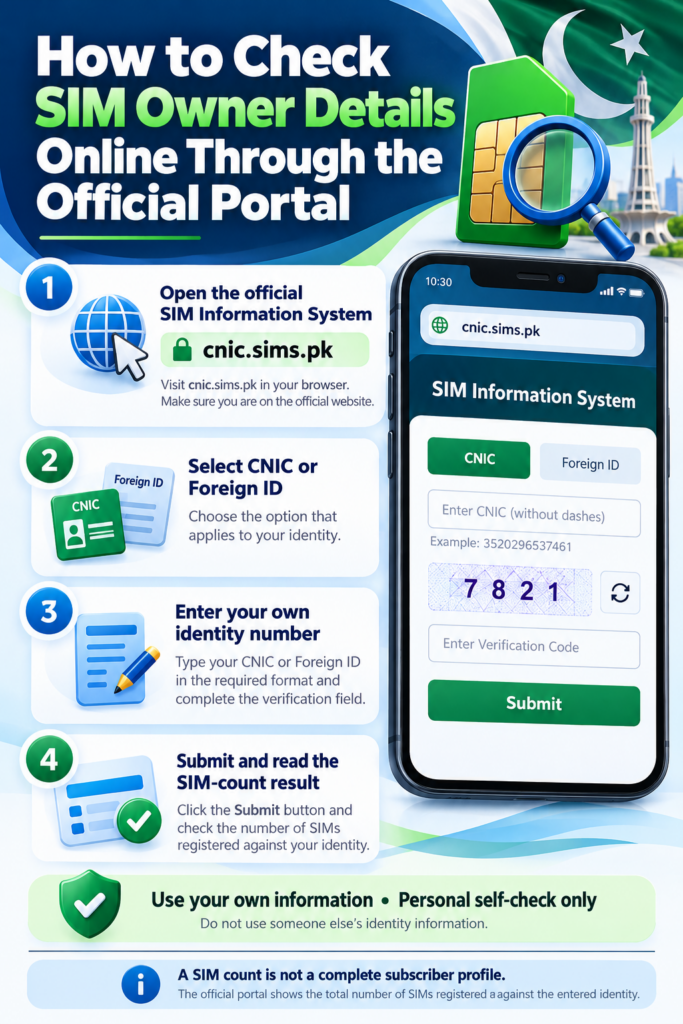
Follow this step-by-step process to review the SIM-count information associated with your own identity.
Step 1: Open the SIM Information System
Visit https://cnic.sims.pk/ directly in your browser. Check the domain in the address bar before entering information. Familiar colours, government-related wording, or SIM-related branding do not prove that a website is official.
Step 2: Select the correct identity option
The official page provides CNIC and Foreign ID options. For a CNIC-based check, select CNIC. If you are a foreign national and the portal’s Foreign ID option applies to your situation, follow the instructions displayed on the page.
Do not use someone else’s identity number for an unauthorised lookup.
Step 3: Enter your own identity number
Enter the number in the format accepted by the form. The live portal shows a CNIC example without dashes. Review every digit before continuing, because a typing mistake can prevent the request from being processed correctly.
Step 4: Complete the verification field
The page displays a verification field. Enter the requested text or follow the verification instruction shown on the website. If the characters are difficult to read, refresh the challenge if the page offers that option. Wait until the page has fully loaded before submitting the form.
Step 5: Submit the form
Click the submission button shown on the official page and allow the request to process. Avoid clicking it repeatedly in quick succession. If the page is busy, wait for the response or follow any error message displayed.
Step 6: Read the result carefully
Review the number of SIMs displayed and any network breakdown provided by the service. The result is intended for the SIM-count checking purpose described on the website. Do not treat it as a complete subscriber profile or assume every individual mobile number will be displayed.
Step 7: Decide whether follow-up is needed
If the result matches your records, keep any notes you need for your personal records. If it seems unfamiliar or inconsistent, compare it with your own records and contact the relevant network operator for assistance. Ask which verification or correction process applies.
For more help, read our guide to checking your own CNIC-linked SIMs.
5. How to Understand Your Online SIM-Check Result
If the result matches your records
If the count appears consistent with the SIMs you remember using, you may keep a note for your personal records. A matching count should not be interpreted as a guarantee that every subscription detail or account-security setting has been checked.
If the result is higher than expected
Review your history of SIM purchases and connections. Consider older numbers and connections whose closure you have not confirmed. If you still cannot explain the count, contact the relevant operator and ask it to investigate through its authorised procedures.
If the result is lower than expected
Check that you selected the correct identity option and entered your information accurately. If the result still appears inconsistent, ask the relevant operator to verify the subscription you are concerned about.
If the result does not identify the number you need
A total SIM count is not necessarily a complete list of individual numbers. Do not conclude that a particular number is or is not registered simply because it is not individually displayed. Contact the operator for assistance with your own subscription if you need a more specific answer.
If the result is unclear
Avoid using unofficial databases to fill information gaps. Ask the operator what it can verify through an authorised process.
6. How to Check a Mobile Network Through the Official SMS Method
The official SIM Information System describes a separate SMS method for checking the network associated with a mobile number.
The website currently displays this example format:
N 03xx3456789
It currently lists 76367 as the SMS destination and Rs. 2 plus tax as the charge. These details can change, so check the instructions on the official SIM Information System before sending a message.
How to use the method
- Open the official website and locate its network-checking instructions.
- Confirm the current SMS format, destination, and charge.
- Replace the example number with the number in the format required by the service.
- Send the message as instructed.
- Read the response and interpret it only for its stated purpose.
This method is intended for network identification. It does not automatically provide the registered person’s private name, CNIC, home address, call history, or live location.
What if you receive no reply?
Check that the message follows the current format and was sent to the correct destination. Make sure your phone can send SMS messages and that your connection is active. If the service still does not reply, try again later or contact your operator for guidance. A missing response is not proof that a number is unregistered or that your identity has been misused.
7. What to Do If the Online SIM-Check Service Does Not Work
A technical error does not automatically mean your CNIC or SIM registration is wrong.
Problem: The website does not open
Check your internet connection and enter the official website address directly. Try reloading the page once or opening it in another browser. If the official service appears temporarily unavailable, try again later. Do not move to a website advertising a private SIM database simply because the official portal is not working.
Problem: The verification field fails
Read the verification text carefully and refresh the challenge if an option is provided. Make sure the page has fully loaded before trying again. If the field continues to fail, try another browser or return later. Repeated verification failures alone do not prove that your CNIC is blocked.
Problem: The CNIC is rejected
Confirm that you selected the correct identity option and entered the number in the accepted format. Check for missing or duplicated digits. If correct information is still rejected, try again later and seek help through an official support channel rather than sending your CNIC to an unknown person.
Problem: The page loads without a clear result
Wait for the request to finish and check whether an error message or additional instruction is displayed. If the result remains unclear, try later or contact the relevant operator about the subscription you need to verify.
Problem: The SMS method does not reply
Check the current message format, destination, applicable fee, and your ability to send ordinary SMS messages. If the service still does not respond, contact your mobile operator.
Problem: You see a result you cannot explain
Stop repeating the same check indefinitely. Record what seems inconsistent, compare it with your own records, and ask the relevant operator to investigate.
For website-specific troubleshooting, read What to Do When the Official SIM-Check Website Does Not Open.
8. What to Do If You Find an Unknown SIM on Your CNIC
If your concern is an unfamiliar SIM registration associated with your own identity, use the CNIC-based process rather than assuming a number-based network check will resolve it.
First, confirm the result. Check that you entered the correct information and understood the displayed count.
Second, compare your records. Consider connections you have purchased, replaced, or stopped using. If you retained SIM receipts or service-request references, review them.
Third, contact your operator. Use its official support channel or an authorised service centre. Explain the discrepancy and ask which verification process applies.
Fourth, request the appropriate action. If the operator confirms that a registration needs investigation or correction, ask about the applicable disowning, cancellation, or correction procedure.
Fifth, keep evidence. Save complaint references, relevant notifications, receipts, and any confirmation provided by the operator.
An unexpected count is a reason to investigate, not definitive proof of fraud. If the issue remains unresolved, review the PTA Complaint Management System and its current instructions.
If you suspect identity theft or cybercrime, consult the NCCIA identity-theft guidance and the official NCCIA complaint portal.
9. How to Verify a Newly Purchased SIM
If you have recently purchased a SIM, follow the operator’s authorised registration and activation process.
Use an authorised sales channel, provide the required information through the approved procedure, and retain any receipt or transaction reference. Ask the operator how to confirm activation and what to do if the registration details appear inconsistent.
A SIM card being physically in your possession does not, on its own, prove that every registration detail is correct.
If you experience a registration or biometric-verification problem, contact the operator rather than paying an unknown person who claims they can bypass the process.
For further guidance, read our Biometric Verification and SIM Registration article and New SIM Verification Checklist.
10. How to Protect Your Information During Online SIM Checking
A legitimate self-check should not require you to give unnecessary personal information to an unknown person or website.
- Open the official website directly and check the domain before entering identity information.
- Use your own CNIC for your personal check.
- Never share an OTP or password with an unknown contact who promises to retrieve a SIM report.
- Avoid uploading CNIC images to unfamiliar websites.
- Do not install unknown APK files to unlock a claimed private database.
- Be cautious if a service promises complete subscriber details, call records, or real-time location using only a number.
- Keep important account passwords unique and enable two-factor authentication where available.
The NCCIA identity-theft guidance recommends protecting personal information, checking suspicious links and messages, monitoring important accounts, and using strong passwords.
If you have already shared sensitive information with a suspicious website, stop sharing anything further. Secure affected accounts, contact your bank if financial details may be at risk, and report suspected fraud through an appropriate official channel.
11. Which Official Organisation Should You Contact?
Different organisations handle different types of problems.
Mobile network operator: Contact the provider if you need to verify your own subscription, investigate an unfamiliar registration, resolve a SIM replacement issue, or ask about disowning a connection.
Pakistan Telecommunication Authority (PTA): If a telecom complaint remains unresolved, review the PTA Complaint Management System and follow its current submission instructions.
National Database and Registration Authority (NADRA): For questions about your identity document, use NADRA’s official CNIC information. CNIC-document issues and telecom-registration issues have different procedures.
National Cyber Crime Investigation Agency (NCCIA): If you suspect identity theft or cybercrime, read the NCCIA identity-theft guidance and use its official complaint portal where appropriate.
Choose the route that matches your issue and keep supporting evidence.
12. Frequently Asked Questions
1. How can I check SIM Owner Details online in Pakistan?
Visit the official SIM Information System, choose the appropriate identity option, enter your own information, complete the verification step, and review the result.
2. Can I check the SIMs registered against my own CNIC?
Yes. The official SIM Information System provides a facility for checking the total number of SIMs registered against a CNIC. Follow the current instructions on the website.
3. Does the online check show every mobile number?
Do not assume that a total SIM count provides a complete list of numbers or a full subscriber record. Contact the relevant operator if you need help with a specific subscription.
4. Can I obtain another person’s name from a mobile number?
A mobile number does not automatically give the public access to another person’s confidential subscriber identity. This guide is for personal self-checks and educational purposes.
5. What does the network-checking SMS do?
The official website describes an SMS method for identifying the network associated with a number. Check the live portal for the current message format, destination, and charges.
6. What should I do if the website rejects my CNIC?
Check the identity option, format, and digits you entered. If the problem continues, try again later or ask the appropriate official support channel for guidance.
7. What if the verification field keeps failing?
Refresh the verification challenge if possible, wait until the page fully loads, and try another browser or try later. A verification error alone does not prove your registration is wrong.
8. What should I do if my SIM count is unexpected?
Compare the result with your own records and contact the relevant operator if you cannot explain the difference. An unexpected count is not, by itself, conclusive proof of fraud.
9. Can an online checker provide live SIM location?
A basic SIM-registration or network-checking service is not a public live-location tracking service. Avoid websites making such promises.
10. Where can I report suspected identity theft?
Review the NCCIA identity-theft guidance and follow the current instructions on the official NCCIA complaint portal.
13. Official Resources and Further Reading
Use these resources to confirm current procedures:
- Pakistan SIM Information System — CNIC-linked SIM-count checking and network-identification instructions.
- Pakistan Telecommunication Authority — official telecom regulator website.
- PTA Complaint Management System — telecom complaint information.
- PTA / NT CERT SIM-Swapping Advisory — security guidance about SIM-swapping fraud.
- NADRA CNIC Information — official identity-document information.
- NCCIA Identity-Theft Guidance — personal information and identity-theft safety advice.
- NCCIA Complaint Portal — official cybercrime complaint route.
Check the live official pages before acting, because instructions, fees, and service availability may change.
Conclusion
Learning how to check SIM Owner Details online in Pakistan starts with understanding which information you need. The official SIM Information System helps you review the SIM count associated with your own CNIC, while its separate SMS method provides network-identification information.
If the website or SMS service fails, follow the troubleshooting steps instead of trusting an unofficial database. If you find a registration you cannot explain, contact the relevant operator and keep a record of the outcome. If you suspect identity theft or cybercrime, use the appropriate official reporting channel.
Remember: Check your own registrations, use official resources, protect your identity information, and never assume that a mobile number gives you unrestricted access to someone else’s private records.
Disclaimer: This article is for educational purposes and personal self-checks only. It does not provide access to confidential subscriber data, another person’s private records, or live-location tracking. Confirm current requirements with the relevant official service or mobile network operator.
Leave a Reply