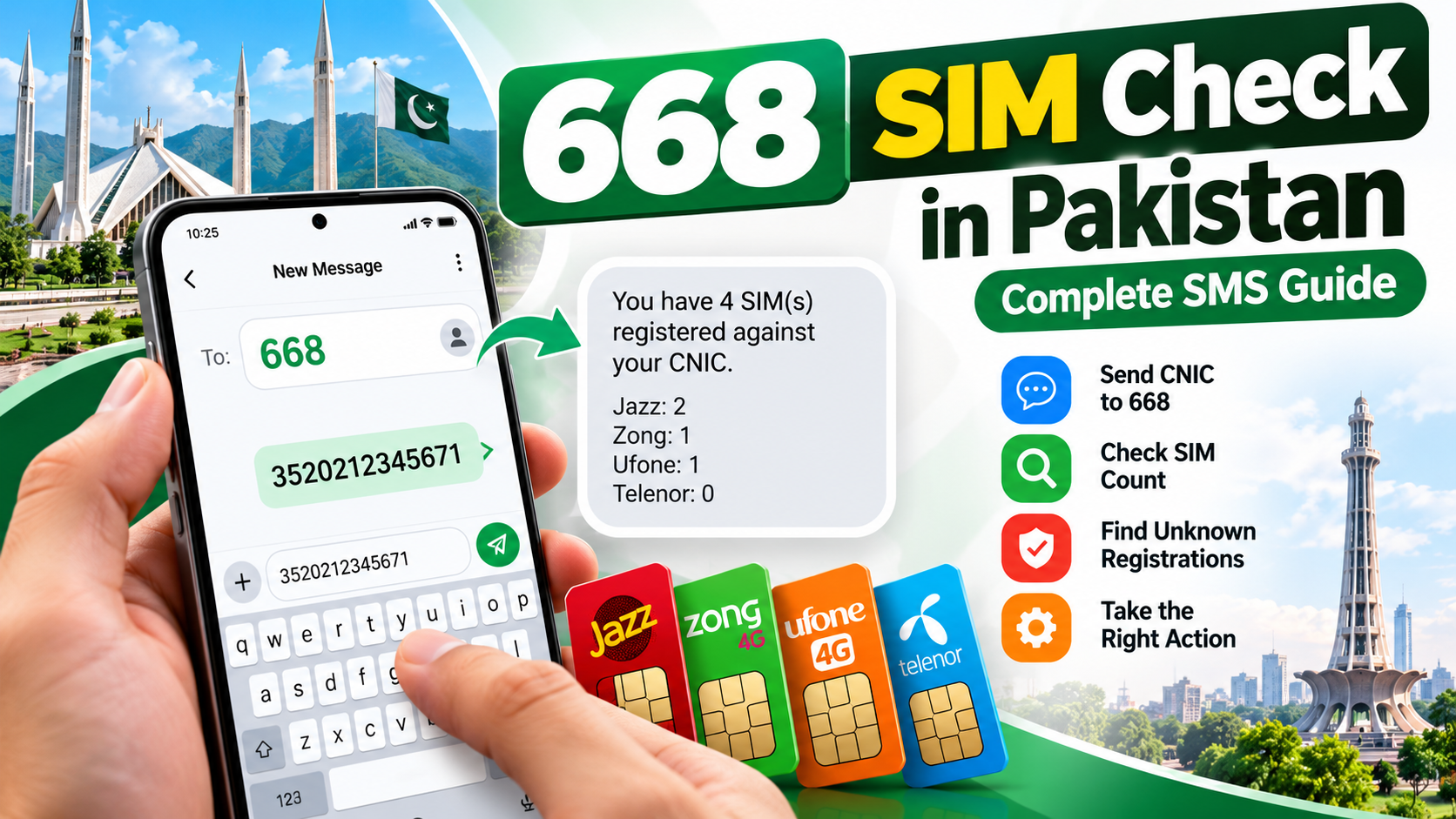
Checking SIM registrations linked to your identity is an important part of managing your mobile connections in Pakistan. If you have used different mobile networks, changed numbers, replaced a SIM, or kept an old connection for emergencies, you may not remember every subscription associated with your CNIC.
The 668 SIM Check service provides a way to review SIM registration counts linked to your own Computerized National Identity Card (CNIC). Instead of relying on an unknown website or an unofficial database, you can use the prescribed SMS method or visit the official Pakistan Telecommunication Authority (PTA) SIM Information System.
If you want to learn more about SIM Owner Details in Pakistan, including CNIC-based SIM verification methods, registration information, and ways to address unfamiliar SIM records, visit our complete SIM Owner Details Guide. This guide focuses specifically on the 668 SMS method, explaining how to send your CNIC correctly, understand the response, and troubleshoot common issues.
This guide explains how the 668 SMS check works, how to enter your CNIC correctly, what to expect from the response, what to do if the message does not arrive, and how to handle a result that does not match your records. It also explains the limitations of the service so you can use it safely and realistically.
For a broader overview of CNIC-based SIM verification, visit our SIM Owner Details Guide. If you specifically want to check registration counts through SMS, follow the 668 SIM Check steps explained in this article.
Quick Answer: How to Check SIMs Through 668
To check SIM registrations associated with your own CNIC:
- Open the messaging application on your mobile phone.
- Enter your 13-digit CNIC number without dashes or spaces.
- Send the message to 668.
- Review the response and compare the reported information with your own SIM history.
- If you notice an unexplained discrepancy, contact the relevant mobile operator through its official customer support channel.
Charges may apply to the SMS. Confirm the current service cost with your mobile operator if the amount matters to you.
You can also use the official PTA SIM Information System to check the number of SIMs registered against your CNIC. The online service has separate options for CNIC and Foreign ID users.
Important: The 668 service is intended for self-verification. It should not be treated as a public database for obtaining another person’s private subscriber information.
1. What Is 668 SIM Check in Pakistan?
668 is an SMS-based SIM registration checking service referenced in PTA consumer guidance. It helps individuals review how many SIM connections are associated with their own CNIC across mobile networks.
The purpose is to help consumers identify whether their registration count appears consistent with the connections they have used or authorised.
For example, you may currently use one number for personal calls, another for work, and a separate connection for mobile data. You may also have used a different number several years ago. Reviewing the SIM count can help you identify whether your records need further investigation.
The service is especially useful because people do not always remember every connection they have obtained. Numbers can be replaced, forgotten, or retained in old records long after they stop being part of everyday life.
However, a count is only a starting point. It does not automatically tell you why a particular registration appears in the record. If something looks unfamiliar, you should verify it with the relevant mobile operator instead of immediately assuming that fraud has occurred.
2. Why Should You Check SIMs Registered on Your CNIC?
Your CNIC is an important part of your identity, and mobile subscriptions are associated with subscriber registration records. Reviewing those records helps you understand which connections may be linked to your identity.
There are several practical reasons to perform a check.
Identify unexpected registration counts
If you believe you have two SIM connections but your result indicates a higher number, you may need to investigate the difference. An unexpected count does not establish wrongdoing by itself, but it is a reason to verify your records.
Review old connections
People change mobile operators, jobs, phones, and cities. A number that you stopped using may still need to be reviewed through the operator’s official process.
Keep personal records organised
Checking periodically can help you maintain a clearer record of the mobile subscriptions you use. This is particularly useful for people who have separate personal and work connections.
Respond to possible registration misuse
If an operator confirms that a SIM was registered using your identity without your authorisation, you can ask the operator about the appropriate blocking, disowning, or investigation process.
Improve account security awareness
Mobile numbers are sometimes used for account verification and password recovery. Keeping track of your own subscriptions is one part of responsible digital security, although a 668 check is not a complete cybersecurity audit.
3. What You Need Before Sending an SMS to 668
Preparing the correct information can help avoid unnecessary errors.
Your own CNIC number: Use the 13-digit number printed on your identity card. Do not publish it in website comments or send it to an unknown person who claims to offer SIM verification.
A mobile phone with SMS capability: The method uses an SMS rather than a web browser. Your phone should be able to send outgoing messages.
Access to a mobile network: If your phone has no service, outgoing SMS may fail. Check your signal and SIM status before trying again.
Enough balance or an eligible SMS allowance: Charges may apply, so make sure your connection can send the message.
A safe place to note the result: If you need to investigate a mismatch later, keeping a private record of the date and response can be helpful. Avoid sharing screenshots that expose your CNIC or other sensitive information.
You do not need to provide your CNIC to a random website, install an unofficial SIM-check application, or give an OTP to a stranger to perform the basic SMS check.
4. Step-by-Step: How to Check SIMs Through 668
Follow these steps carefully when checking your own registration information.
Step 1: Open your messaging application
Open the standard SMS or Messages application on your mobile phone. Make sure you are composing a text message rather than a WhatsApp message or an online form.
Step 2: Enter your CNIC number
Type the 13 digits of your CNIC without dashes or spaces.
For example, a fictional-format example is:
3520212345671
This is an example of the format, not a real person’s registration information. Use your own CNIC when performing the actual check.
Step 3: Check the digits before sending
Before sending the message, count the digits and check that you have not accidentally inserted spaces, punctuation, or a missing number.
A formatting mistake can prevent the service from processing your request correctly. If you are unsure, compare the entered digits with your identity card privately.
Step 4: Send the SMS to 668
Enter 668 as the recipient and send the message.
Charges may apply. If you want to confirm the current price, check with your mobile operator rather than relying on an old online article.
Step 5: Wait for the response
Allow time for the service to process the message. The response time may vary depending on network conditions, service availability, and other factors.
Do not send repeated messages immediately if the first response is delayed. First check whether the original message was sent successfully.
Step 6: Review the information
Read the response carefully. Use the reported SIM counts to compare the registration record with your own history.
If the result appears unexpected, do not conclude that a particular person is responsible or that a crime has definitely occurred. Treat it as a discrepancy requiring confirmation.
Step 7: Follow up if necessary
If you cannot explain the result, contact the relevant mobile operator through its official customer service channel. Explain that the SIM registration count associated with your CNIC requires verification and ask what information or documentation is needed.
Keep any complaint or reference number provided by the operator.
5. What Does the 668 SMS Response Mean?
The purpose of the response is to provide information about SIM registrations associated with your CNIC. It should be understood as a registration-count check, not as a complete subscriber dossier.
If the response reports counts associated with different operators, compare those counts with the networks you have used. Remember that your own history may include old connections, replacements, or arrangements you no longer remember clearly.
For example, imagine that you currently use a Jazz connection and a Zong connection, but the response appears to show an additional registration associated with another network. That result alone does not identify the number, explain its history, or prove unauthorised activity.
The sensible next step is to review your past connections and ask the relevant operator to investigate the discrepancy.
What if the count matches your records?
If the result appears consistent with the connections you know about, keep your personal records updated. You do not need to repeat the check every day. Consider reviewing your registrations periodically and after important changes, such as obtaining or losing a SIM.
What if the count is higher than expected?
Check whether you have forgotten an old number or overlooked a work-related or family-use arrangement. If you still cannot explain the result, seek verification from the operator.
What if the count is lower than expected?
Check that you understood the response correctly and consider whether any connections have been closed, replaced, or otherwise changed. If the discrepancy remains, contact the relevant operator for clarification.
A 668 response is useful information, but the operator is the appropriate channel for questions about a specific subscription.
6. Does 668 Show the Actual Mobile Numbers?
You should not assume that 668 provides a complete list of every phone number associated with your CNIC. Its primary purpose is to help check SIM registration counts.
If you need to investigate an unfamiliar registration, the count alone may not be enough to identify the connection. Contact the relevant operator and ask about its official identity-verification and complaint procedure.
Be cautious of websites that claim they can turn a CNIC into a complete list of private mobile numbers or reveal a subscriber’s personal profile. A website making such a claim is not automatically authorised or trustworthy.
The same distinction applies to names, addresses, call records, private messages, passwords, and live locations. A SIM registration count is not permission to access another person’s private information.
7. How to Check SIM Registrations Online
If you prefer using a browser, you can use the official PTA SIM Information System.
Visit: https://cnic.sims.pk/
The official portal provides a CNIC option and a Foreign ID option for applicable users.
The general process is:
- Open the official website by entering its address yourself.
- Select the appropriate identity option.
- Enter the requested information in the relevant field.
- Complete the verification shown on the page.
- Submit the form.
- Review the result displayed by the system.
The portal states that it can show the total number of SIMs registered against a CNIC. Its result interface also displays network-level counts.
Use the website only for your own identity information or where you are properly authorised to perform the relevant check. Do not enter your CNIC into an imitation page merely because it uses a similar name or logo.
Should you use SMS or the online portal?
The SMS method may be convenient when you want to use a basic mobile phone without opening a browser. The online portal is useful if you prefer a web interface.
Neither method should be treated as a public reverse-lookup service for another person’s private subscriber identity.
If the two methods appear to provide information you do not understand, record what you see and contact the appropriate operator or official support channel for clarification.
8. 668 SMS Check vs the PTA Online Portal
Both methods are used to check SIM registrations associated with your own identity, but the way you access them is different.
| Feature | 668 SMS method | PTA online portal |
|---|---|---|
| Access | Text message | Web browser |
| Internet connection | Not required for sending SMS | Required |
| Information entered | Your own CNIC | CNIC or applicable Foreign ID |
| Cost | SMS charges may apply | Internet usage may apply |
| Result | Registration-check response | On-screen registration information |
| Best use | A simple mobile-based check | A browser-based self-check |
The best option depends on your circumstances. If you cannot use SMS, try the official portal. If the portal is temporarily unavailable, you may try the prescribed SMS method.
If both methods produce confusing results, do not rely on a third-party website promising more detailed private information. Ask the relevant operator to verify the registration.
9. What If You Do Not Receive a Reply From 668?
A missing response can be frustrating, but it does not necessarily mean that your CNIC or SIM record is incorrect.
Several issues may prevent a message from being delivered or answered.
Incorrect CNIC format
Check that you entered all 13 digits without dashes or spaces. Correct any typing error before trying again.
Insufficient balance or SMS restrictions
Your outgoing message may fail if your connection cannot send SMS because of balance, account restrictions, or a service issue. Check your phone’s message status and account balance.
Weak network signal
Poor coverage or a temporary network interruption can delay or prevent message delivery. Move to an area with better reception and check whether other SMS messages can be sent.
Temporary service unavailability
The service may not respond immediately. Wait a reasonable amount of time before making another attempt.
Incorrect recipient
Confirm that you sent the message to 668 rather than to another short code. Different telecom services may use different numbers for different purposes.
What should you do next?
First, check whether your message was sent successfully. Then verify the CNIC format, network signal, and ability to send SMS. If the issue continues, contact your mobile operator and ask whether the SMS service is available on your connection.
You can also use the official PTA SIM Information System as an alternative. Avoid repeatedly sending messages without checking the original problem, particularly if charges may apply.
10. What If the Result Shows a Registration You Do Not Recognise?
An unfamiliar count deserves attention, but it should be investigated carefully.
Begin by reviewing your own history. Think about old SIMs, numbers used for work, replacement connections, and subscriptions you stopped using. Sometimes an apparently unfamiliar result has a straightforward explanation.
If you still cannot account for the registration, contact the mobile operator associated with the discrepancy.
Explain that your CNIC-based SIM registration information does not appear to match your records. Ask the operator to verify the subscription through its official process and explain what action is available if the registration was not authorised.
Keep the date of your enquiry, the operator’s name, and any complaint or reference number. If the operator confirms that a SIM was registered without your authorisation, ask about the appropriate blocking or disowning process.
Do not post your CNIC, suspected phone number, or screenshots containing private information in public comments. Do not attempt to identify or confront a suspected person using unverified information.
If the issue remains unresolved after contacting the operator, you can consider using the PTA Complaint Management System to submit or track a telecom complaint.
11. Important Differences Between 668, 667, and 76367
These short codes should not be treated as interchangeable.
668: Used for checking SIM registrations associated with your own CNIC.
667: Associated with a separate SIM-related verification process. Do not assume it provides the same information as the 668 CNIC count check.
76367: The official SIM Information System identifies this as a network-identification service. Its published instructions say to send N 03xx3456789 to 76367 to check the network of a number, with a displayed charge of Rs. 2 plus tax. Confirm the current instructions and charges before using it.
If your goal is to check the number of SIMs registered against your own CNIC, use the prescribed 668 method or the official PTA SIM Information System.
If you need help with a specific mobile connection, ask the relevant operator which verification process applies to your situation.
12. How to Protect Your CNIC During SIM Verification
Your CNIC and mobile account information should be handled carefully. A legitimate need to check SIM registrations does not mean you should share your identity information with every website or person offering help.
Follow these precautions:
- Use the official PTA SIM Information System for the online check.
- Enter your CNIC only where it is genuinely required for the service.
- Avoid submitting identity documents through unknown forms.
- Never share an OTP with someone who contacts you unexpectedly.
- Do not disclose passwords or mobile account PINs to an unverified person.
- Avoid installing unknown APK files advertised as SIM-checking tools.
- Keep screenshots and complaint records private.
- Verify customer support details through the operator’s official website or recognised service channel.
Be especially cautious of messages that create urgency, such as claims that your SIM will be blocked unless you provide an OTP immediately. Do not click suspicious links or provide sensitive information simply because a message claims to come from a telecom company.
If you believe your identity information has been misused, contact the relevant operator and ask what protective steps are appropriate.
13. Common Mistakes to Avoid During a 668 SIM Check
Sending a CNIC with the wrong number of digits
An incorrect or incomplete CNIC can prevent the request from working. Check the number before sending it.
Assuming the service reveals every number
A registration count should not be confused with a complete list of phone numbers or subscriber details.
Treating every unexpected result as fraud
Old connections, forgotten numbers, and other registration issues may need to be considered before reaching a conclusion.
Using unofficial lookup websites
A website claiming to reveal private information may be misleading or may put your data at risk. Use official verification channels instead.
Sending repeated SMS messages without checking the cause
Repeated attempts may waste time and could incur charges. Check the original message status, format, and network connection first.
Ignoring an unresolved discrepancy
If the count remains unexplained after reviewing your own records, contact the relevant operator and keep a complaint reference if one is provided.
Sharing private information publicly
Do not publish your CNIC, OTP, or sensitive screenshots in blog comments or social media posts.
14. When Should You Check Your SIM Registrations?
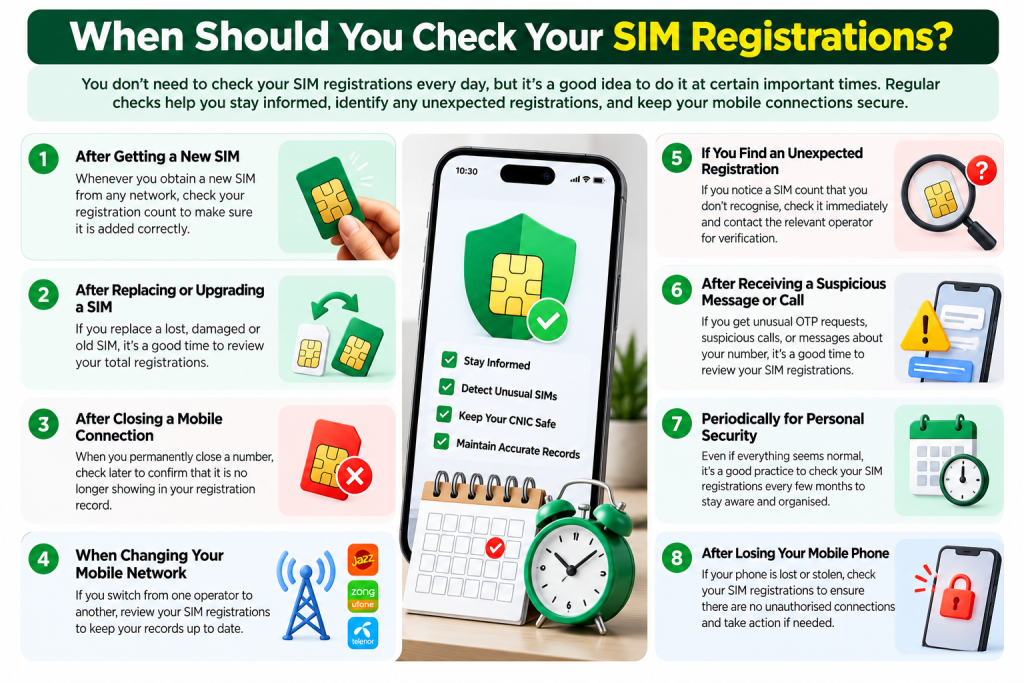
There is no need to treat SIM checking as a daily activity. A periodic review is a practical way to stay aware of the connections associated with your identity.
Consider checking after:
- Obtaining a new SIM.
- Replacing or losing a SIM.
- Closing a mobile connection.
- Changing your primary mobile network.
- Discovering an unexpected registration count.
- Receiving a suspicious SIM-related message.
- Dealing with an unresolved registration complaint.
Keep a private list of the connections you currently use and update it when your circumstances change. This makes it easier to recognise an unexplained count during a later review.
15. Frequently Asked Questions About 668 SIM Check
What is 668 SIM Check in Pakistan?
It is an SMS-based method referenced in PTA consumer guidance for checking SIM registrations associated with your own CNIC.
How do I check SIMs registered on my CNIC through 668?
Enter your 13-digit CNIC number without dashes or spaces in an SMS and send it to 668. Review the response and follow up with your operator if something is unclear.
Is sending a CNIC to 668 free?
Charges may apply. Check with your mobile operator for the current applicable cost before sending the SMS.
Can I check SIM registrations without internet access?
The SMS method does not require a web browser or mobile internet connection, although your phone needs a working mobile connection capable of sending SMS.
Can I check SIM registrations online?
Yes. You can visit the official PTA SIM Information System and follow the on-screen instructions.
Does 668 reveal another person’s name or address?
It should not be treated as a public service for retrieving another person’s private subscriber identity or address.
What if the SMS reply does not arrive?
Check the CNIC format, message status, network signal, and ability to send SMS. If the issue continues, contact your operator or try the official online portal.
What if I find an unfamiliar SIM registration?
Review your own history first. If you cannot explain the result, contact the relevant operator and request verification through its official process.
Can an old SIM affect my registration check?
An old or forgotten connection may be relevant to an unexpected result. Ask the operator to verify any subscription you cannot account for.
Is the online PTA SIM Information System official?
The SIM Information System is hosted at cnic.sims.pk. Enter the address carefully and avoid imitation websites.
Is 668 the same as 76367?
No. They are used for different purposes. The official portal identifies 76367 as a network-identification service.
Should I download an app to check my CNIC SIMs?
You do not need to install a random APK for the basic 668 SMS check. Avoid unknown applications that ask for sensitive identity information or unnecessary permissions.
What if the mobile operator does not resolve my issue?
Keep your complaint reference and relevant records. You can consider submitting or tracking a complaint through the PTA Complaint Management System.
Final Thoughts
The 668 SIM Check method gives mobile users in Pakistan a practical way to review SIM registration counts associated with their own CNIC. By entering the correct 13-digit CNIC number and sending it to 668, you can request a registration check without relying on an unknown database or installing an unofficial application.
The result should be treated as a starting point, not as a complete explanation of every subscription. If the information does not match your records, review your old connections and contact the relevant operator for verification.
For an online alternative, use the official PTA SIM Information System. If an operator confirms an unauthorised registration and the matter remains unresolved, keep your complaint records and consider the official PTA complaint channel.
Most importantly, protect your CNIC, OTPs, and personal information. Use SIM verification services for your own registration records, rely on official channels, and investigate unexpected results carefully rather than trusting websites that promise access to private subscriber information.
Leave a Reply